Nightly, Self-Hosted, and Green Backup
Posted on January 2, 2026 • 7 minutes • 1340 words • Other languages: Français
Following a move, I pulled out quite a bit of old dormant hard drives and some hardware from the closet.
Why not reuse this functional equipment to have an additional backup at home? How can I consume as little electricity as possible for the planet and my bill? How can I trigger my backup in the middle of the night with a server that turns on and off automatically? How can a remote server back itself up autonomously to my home in a secure way?
There are a thousand and one answers to these questions, but I’ve chosen to share what I’ve implemented.
A Simple and Secure Architecture
My objectives for the architecture were as follows:
- No port opening on my router (NAT)
- Manage a dynamic IP constraint on my personal internet connection
- Route traffic through a secure VPN tunnel
- Use BorgBackup
for backups
- Use BorgMatic on the client side
- Use BorgWarehouse to manage BorgBackup repositories on the backup server
For the first three constraints, I will easily address them with Wireguard. I actually wrote an article in 2022 with a small performance benchmark (vs OpenVPN) if you’re interested.
WireGuard will allow me several things:
- Encapsulate network traffic in an encrypted tunnel between my servers in the datacenter and my home backup server.
- Initiate the VPN connection only from my home to my server endpoints
- And consequently avoid opening a port at home, doing NAT, or even knowing my public IP
Here is the simplified diagram I created:
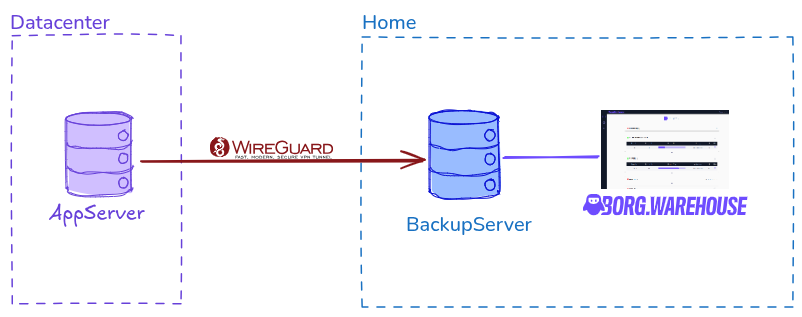
I won’t go into the details of the Wireguard VPN configuration between servers; it’s simple to implement and the documentation is very well done .
Roles to Ensure
- Backup server:
- It determines its startup time and shutdown time
- It handles establishing the Wireguard tunnel (via the endpoint)
- Client server to be backed up:
- It determines when it wants to launch its backup
- It encrypts the BorgBackup backup that it sends to the backup server
The Backup Solution: The Robust BorgBackup
On the client server side, I’m going with a configuration of the excellent Borgmatic . Its documentation is well done and allows you to configure many options in detail. I will trigger the backup from the client at night, during a time slot when my backup server will be on.
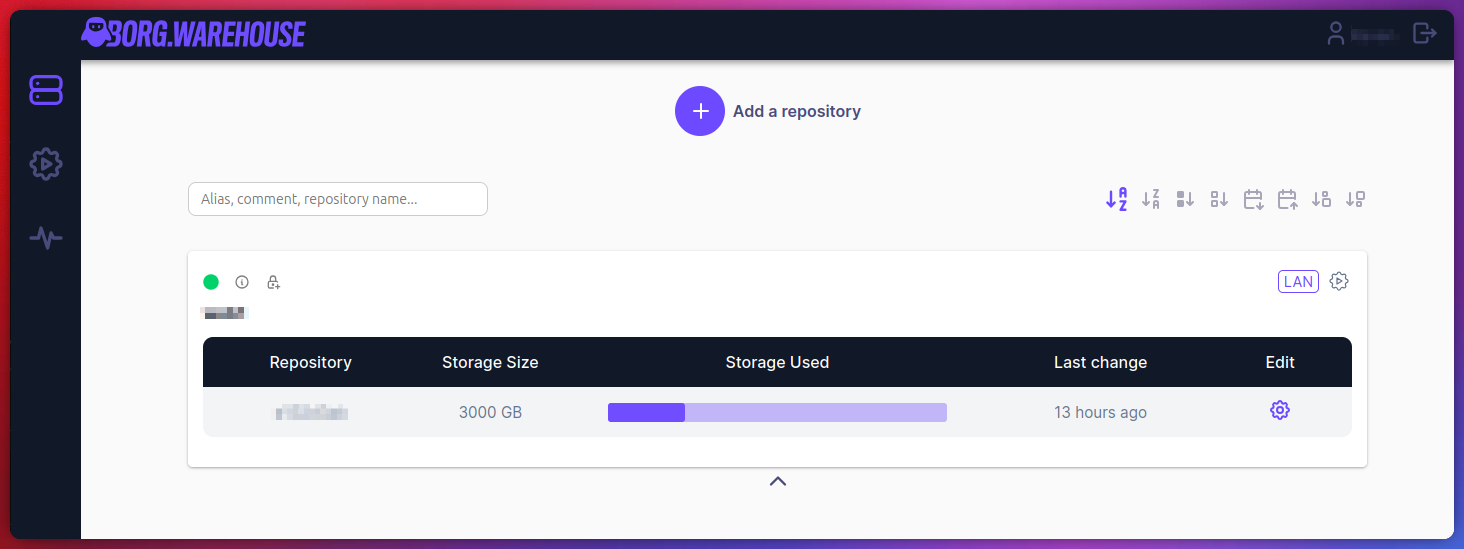
On the home backup server side, I’ll use a BorgWarehouse Docker container . Since I’m going through a VPN tunnel for backups, I’ll configure my repository in LAN mode to have a simple auto-configuration that matches my Wireguard network.
Finally, I’ll enable BorgBackup's append-only mode on the server side and disable repository deletion through the environment variable configuration. Belt and braces, everything is ready on the BorgBackup side!
Automatic Startup and Shutdown of the Backup Server
I went through quite a bit of documentation and I chose the rtcwake package solution as the most suitable for my use case. It’s a package available on several Linux distributions and, according to its manual, does exactly what I’m looking for: “It uses cross-platform Linux interfaces to put the system to sleep and not leave it there beyond a specified date. Any hardware clock (RTC) driver environment that supports standard wake attributes can be used.”. Obviously, an RTC module must be present on your machine, with a functional battery.
rtcwake has several very useful options but I’ll only focus on the available shutdown modes. Out of 9, the only mode options that might interest me are:
standby: Corresponds to ACPI S1 with power still on as well as peripherals, but the CPU is stopped, paused. The return to normal state is almost instant but power consumption is similar to idle, so this mode doesn’t interest me.freeze: This mode does not correspond to an ACPI state. I haven’t researched further but it seems to be a Linux kernel mode, electrical activity is similar to standby. This mode doesn’t fit my use case.disk: Corresponds to ACPI S4 (Suspend-to-disk) with power off, and RAM dumped to disk. This mode works for me in terms of electrical activity close to constant 0. However, a quick search on the net shows that this mode can be unstable for use on a server seeking stability and security.off: Corresponds to ACPI S5, it’s a poweroff, it doesn’t fit my use case because my backup server has encrypted partitions requiring manual intervention if it’s completely shut down.mem: Corresponds to ACPI S3 (Suspend-to-RAM) and speaks for itself: “This state allows significant energy savings, as all system components are put to sleep, except memory, which is placed in self-refresh mode to maintain its contents.” This is the mode I need!
Choosing the Schedule and Setting Up a Cron
In my case, I have a french electricity contract with an off-peak (HC) and peak hours (HP) system (I don’t know if it exists in other countries ?). In other words, I pay for my electricity:
- €0.1635/kWh from 00:32 to 6:32 and from 15:02 to 17:02
- €0.2081/kWh outside of the above time slots
So I set my server wake-up at 1 AM, and its sleep at 7 AM:
|
|
My client server’s backup is triggered at 01:05 every day, and the wake-up time slot of my backup server ensures large volume transfers but also potential automatic system maintenance operations (updates, RAID sync…).
Creating an Additional Script for rtcwake
As you noticed on the cron line above, I don’t execute rtcwake directly. In fact, I created a small script to perform a few checks before suspending:
- An operation on my server’s MDADM RAID must not be in progress
- The backup in BorgWarehouse must be finished (I check the container’s processes)
I’m sharing my work, feel free to adapt it to your use cases! This script is designed for Debian with an MDADM raid and BorgWarehouse in a Docker container.
|
|
Power Consumption and Cost
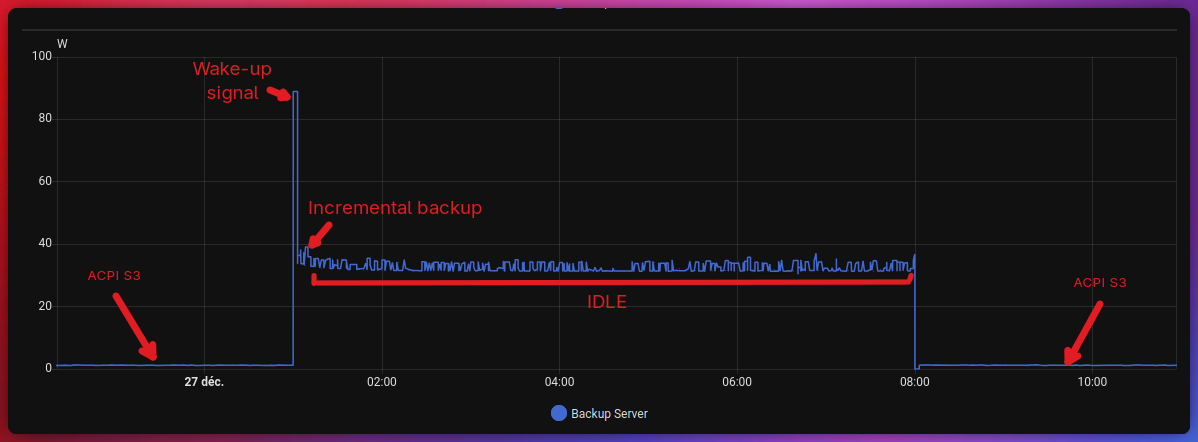
If you read this blog, you know that I use Home Assistant for my home automation and it allows me to know my house’s electricity consumption and the devices I have. So we see that ACPI S3 state consumes between 0 and 1W. To be honest, my plug doesn’t even have sufficient precision because consumption in this S3 mode is ridiculously low.
We also see that the idle mode of my backup server is on average 32W. On the graph, we can see the backup, incremental for this day, and therefore very fast. I could drastically reduce my server’s power-on window to further optimize consumption. We’ll see in the coming weeks, I’ll study backup times and consumption graphs to adapt.
According to my calculations and based on my electricity subscription (HC/HP), here are the consumptions for 3 scenarios:
| Scenario | kWh/month | €/month | kWh/year | €/year |
|---|---|---|---|---|
| 24/7 | 23.36 | €4.51 | 280.32 | €54.17 |
| 01h–07h | 5.84 | €0.98 | 70.08 | €11.72 |
| 01h–04h | 2.92 | €0.48 | 35.04 | €5.73 |
The savings are therefore enormous in terms of consumption, with the advantage of having data backed up at home, in complete security.
Happy self-hosting!
If you appreciate my articles and projects, support me on Liberapay .