Why my new YubiKey could no longer unlock KeePassXC
Posted on May 25, 2026 • 3 minutes • 616 words • Other languages: Français
I’ve been using YubiKeys for several years. I use them as a second factor for U2F authentication, as an OTP generator, and also to strengthen access to my KeePassXC database via an HMAC-SHA1 challenge-response mechanism (see KeePassXC documentation ).
It’s precisely this last use case that recently caused me some trouble.
While migrating to a YubiKey 5C to benefit from USB-C, now present on most of my devices, I discovered something rather worrying: the newer Yubico tools do not provision HMAC-SHA1 challenge-response in exactly the same way as the older tools.
For several years, I configured my keys using the YubiKey Personalization Tools . At the time, I had carefully backed up my HMAC secret so I could reprogram a backup key if needed.
But today, when reprogramming a new YubiKey 5C with exactly the same secret, I was unable to open my KeePassXC database 🤔
First reaction: a major stress spike… Had I made a mistake when saving my secret? Yet my approach had already been tested and validated multiple times over the years with fully functional backup keys!
After some research, I realized the issue was not with the secret itself, but with how challenge-response had been configured on the key at the time.
Older Yubico personalization tools offered several advanced options (such as “fixed 64-byte input” mode) that affect how challenge-response behaves. Newer tools like ykman do not offer this level of customization and instead use a more standardized implementation. As a result, a key programmed today with ykman can produce a different response than a key programmed years ago with YubiKey Personalization Tools
, even when using the same HMAC secret.
I found several sources discussing this issue, including this GitHub issue , which was particularly helpful.
The real problem here is therefore the implicit dependency, poorly or not documented, on the tooling used during the initial configuration of the key. If you configured your YubiKeys several years ago using YubiKey Personalization Tools , then when you need to reprogram a new key, you may potentially need the same tool… which is now end-of-life and may become increasingly difficult to run over time.
Yubico has gradually phased out most of its legacy GUI tools in favor of ykman and its command-line utilities. Today, essentially only the following remain:
- Yubico Authenticator (for viewing OTP codes)
- YubiKey Manager CLI, aka
ykman(for configuration)
Personally, if you previously used YubiKey Personalization Tools, I recommend:
- Removing your challenge-response configuration from KeePassXC
- Reprogramming your keys using YubiKey Manager CLI
- Setting up the challenge-response again in KeePassXC
⚠️ Warning: before doing anything, make sure you can still access your KeePassXC database through another method. ⚠️ Reconfiguring your YubiKeys will also invalidate access to older versions of your database that were protected with the previous challenge-response setup.
If, like me, you’ve been managing backup keys for years, this migration will likely save you from a few stressful moments when replacing or reprogramming a YubiKey.
Updating HMAC-SHA1 challenge in KeePassXC
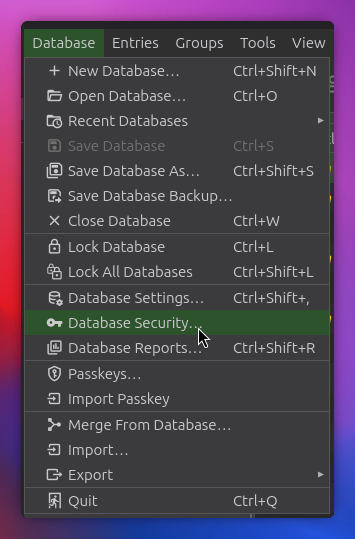
The process is simple: unlock your KeePassXC database, then go to the security settings:
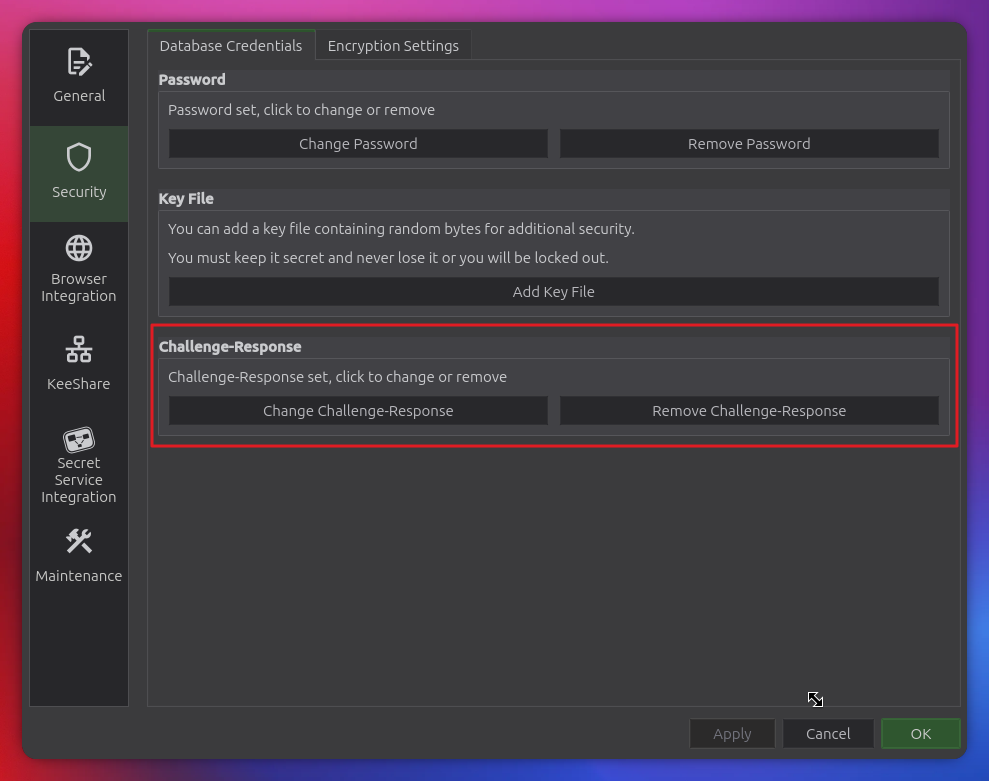
You can then remove the challenge here (or modify it, but I preferred to remove it first):
Recreating the challenge-response on slot 2
To do this, I used the Yubico CLI with the options provided in their documentation .
|
|
All that’s left is to go back into your KeePassXC database and recreate the challenge-response!
It’s a short article, but if it can save some of you from a major panic thinking you incorrectly saved your challenge secret key, I’ll be happy 😊